






What is a Print Signature?
On certain book projects, the pages of the book are printed on large sheets of paper. Known as Signatures, these sheets have multiple pages printed on each side.
Signatures are most often associated with long-run book orders printed on offset presses. The use of Signatures speeds up the printing process, simplifies the binding operation, and reduces the amount of paper waste.
All Signatures contain page counts in multiples of four. Common examples include 64-page, 32-page, 24-page, 16-page, 12-page, 8-page, and 4-page Signatures. How many pages make up a Signature is determined by the book's page size as well as the size of the paper utilized by the printing press.
Pages printed on a Signature sheet may look out of order and upside down, but the pages have actually been carefully arranged on the Signature sheets so they will appear in the correct order and orientation once the sheets are printed, folded, bound, and trimmed.
Most printers will prefer to lay out the Signatures for your book project, so it will be best if you do not submit your page files as Signature(s). Instead, it is recommended that you submit your file as individual pages, one after the other, in the exact order they will appear in the finished book.
By the way, if your book is 64 pages in length, create one file containing all 64 pages…don't submit 64 files with each file containing a single page. Also, be sure your file includes every page in the book. Even if some pages are completely blank, it is important that they appear in the file to ensure all of the pages get placed in the proper order. If in doubt, check with your printer beforehand.
Submitting your file as individual pages gives your printer much more flexibility, making it easier for them to arrange your book's pages into the Signature layout that will provide the most optimal production run. Arranging the pages (known as Imposition) is one of the steps your printer will perform during the pre-press phase of production.
To produce books in the most efficient manner, many high-volume book printers have set page counts and page sizes for their Signatures. In many cases, if you are able to tweak the page count (or page size) of your book to match up with a Signature offered by your printer it will result in a more cost-effective production run of your book.
For example, let's say your printer were to produce your book using 16-page Signatures. If your book is currently 82 pages, eliminating two pages would enable the page count to be an exact multiple of the print Signature (80 pages in the book = 5 Signatures x 16 pages per Signature). Likewise, if your book is currently 78 pages, adding two pages (even if left blank at the end of the book) would also enable the page count to be an exact multiple of the print Signature (80 pages in the book = 5 Signatures x 16 pages per Signature).

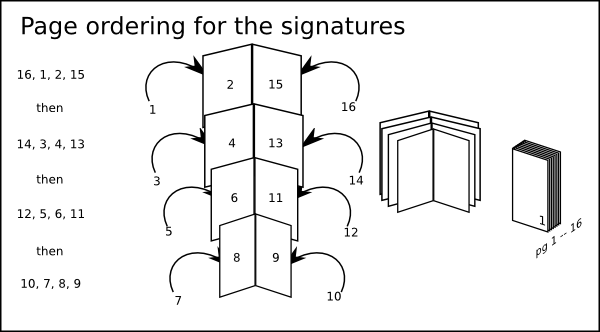
Simplified examples
It is always best to check with your printer about print economies when starting a new project. For example, if your booklet will be 44 pages self-cover, 8.5” X 11”, you will have 2 sets of plates (16 page signatures) for the first 32 pages, another set of plates for the next 8 pages, and yet another set of plates for the last 4 pages taking the count to 44 pages. Depending on the number of booklets you will order, your total cost for a 44-page may be more than if you ordered a 48-page (3 16-page signatures). Extra plates and folder set-ups may very well cost more than the paper cost of the extra 4 pages for printing 48 pages.
If you have the design flexibility, matching your book's page count to your printer's Signature allows for the most efficient use of paper, printing plates, and production time…which often translates into a lower price for your book. Consult with your printer early in the creation process to discuss your plans and specifications. A few minutes spent with your printer at the beginning could translate to cost savings at the end.
What Is a Spread in Printing?
A spread is a pair of facing pages in the final printed document. When you open a book or magazine and lay it flat you have a spread. This means an image or text can run across these two pages and still be legible. When a print job is designed in a professional page layout program it will be laid out as spreads. Depending on the binding method, the facing pages may end up on different signatures. However, when finishing is complete, the pages will end up as spreads again.
It is worth noting there are two kinds of spreads in printing. Readers’ spreads are those that appear on the final job when complete. For example, page 2 appears opposite page 3. Printers’ spreads are how pages are paired up on the signature through the imposition software. For example, in a 16-page job, page 2 may appear opposite page 17.
Printing Imposition Guide
The positioning of the pages on the signatures is known as imposing.
Imposition takes place at the pre-press stage before the job is printed. Specialist software lays out the job in signatures and works out the correct imposition for a particular job. Various factors influence the imposed layout such as page size and the binding style used.
At the imposition stage, it is possible to make allowances for any variations that may happen in the print and finishing process. Issues such as paper stock weight and the binding method used need to be taken into account.
The imposition software places pages in the correct order on the signature for the printing and binding style used.
The correct orientation of pages and spacing between and around them is crucial for a professional and accurate print job.
Additional information can be added to the signatures at this stage. This may include numbering that appears outside the page for checking, color control bars, and registration marks.
How Do I Do Print Signatures for Bookbinding?
It is possible in many of the pages makeup software programs to print jobs as signatures. The signatures can be printed directly to a file, such as a pdf, or a printing device. It is very important to have a clear understanding of how to print signatures work before commencing printing. The number of pages on each sheet and how they are laid out depends on the paper size and stitching or binding method used.
The settings are normally layout presets that can be customized and saved for future use.
Specialist professional software is also available that can create print signatures (imposition). This software can create the correct gutters, allow for bleed and add trims and any other printer marks. Creating print signatures directly from the software or using common third party options such as Adobe Acrobat is cheaper. However, these methods may not deal with bleed and other issues correctly.
